The updated Z Box is designed to feel more stable in everyday use, and cooling plays a major role in that experience. A compact Android device may look simple from the outside, but sustained performance depends on how well the system manages heat over time.
That is why the updated Z Box includes a smarter cooling fan experience. This update is not about making the device larger or more complicated. It is about giving the cooling system better support, clearer controls, and more useful feedback for living-room use.
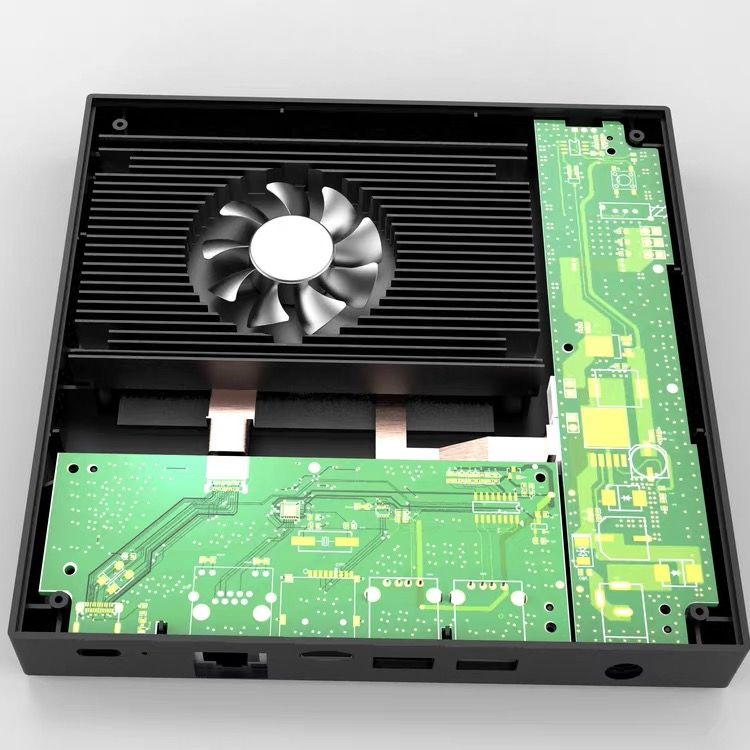
Cooling Is Part of the Whole System
A good cooling design is not only a fan spinning inside the case. It depends on how air enters the enclosure, how heat moves away from the internal components, and how users can adjust cooling behavior when the situation changes.
The updated Z Box combines the cooling fan with a refreshed enclosure layout. More ventilation openings on the sides and bottom give airflow more room to move, helping the fan work as part of a complete thermal path rather than as an isolated component.
Built for More Stable Everyday Performance
When a device is used for streaming, browsing, app control, game-related workloads, or longer sessions on a TV, heat can build up gradually. The purpose of the updated cooling fan is to help the Z Box stay more consistent during those real-world sessions.
The goal is simple: reduce the feeling of performance changing as the device works harder. Instead of treating cooling as something hidden in the background, the updated Z Box makes it a more intentional part of the product experience.
Fan Mode Is Easier to Reach
Cooling control is also easier to access. The redesigned remote includes a dedicated Fan Mode button, so users can reach cooling behavior without digging through deeper settings every time.
This matters in a living-room setup. Room temperature, workload, noise preference, and the type of app being used can all change from one session to another. A direct Fan Mode shortcut makes it easier to adjust the device around those conditions.
Clearer Front-Panel Feedback
The updated Z Box also uses front-panel lighting to make fan modes easier to understand at a glance. Different fan modes can be represented with different light display patterns, giving users visible feedback when cooling behavior changes.
This small detail makes the system feel more transparent. Instead of wondering whether a mode changed successfully, users can get a quick visual confirmation from the device itself.
More Practical Than Decorative
The cooling update follows the same direction as the rest of the updated Z Box design: practical improvements first. The refreshed exterior adds more ventilation. The remote gives direct access to Fan Mode. The front panel helps communicate what the device is doing. Together, these changes make the cooling experience easier to live with.
The fan is still only one part of the system, but it is now supported by a clearer hardware and control experience. For users, that means the updated Z Box is better prepared for longer sessions, changing workloads, and everyday living-room use.
Part of the Updated Z Box Story
The updated cooling fan sits alongside the cleaner Launcher UI, redesigned remote, and refreshed exterior. Each change focuses on the same product goal: make Z Box feel more stable, more understandable, and more comfortable to use from the sofa.
A good cooling system should not call attention to itself all the time. It should help the device stay consistent, give users control when needed, and fit naturally into the way the product is used. That is the role of the updated Z Box cooling fan.