The updated Z Box is not only about what happens inside the device. It is also about making the product easier to use every day, especially from the couch.
That is why the new remote control has been redesigned around the way people actually use a living-room device: launching apps, moving through menus, adjusting volume, switching tasks, and making small changes without reaching for a keyboard or mouse.
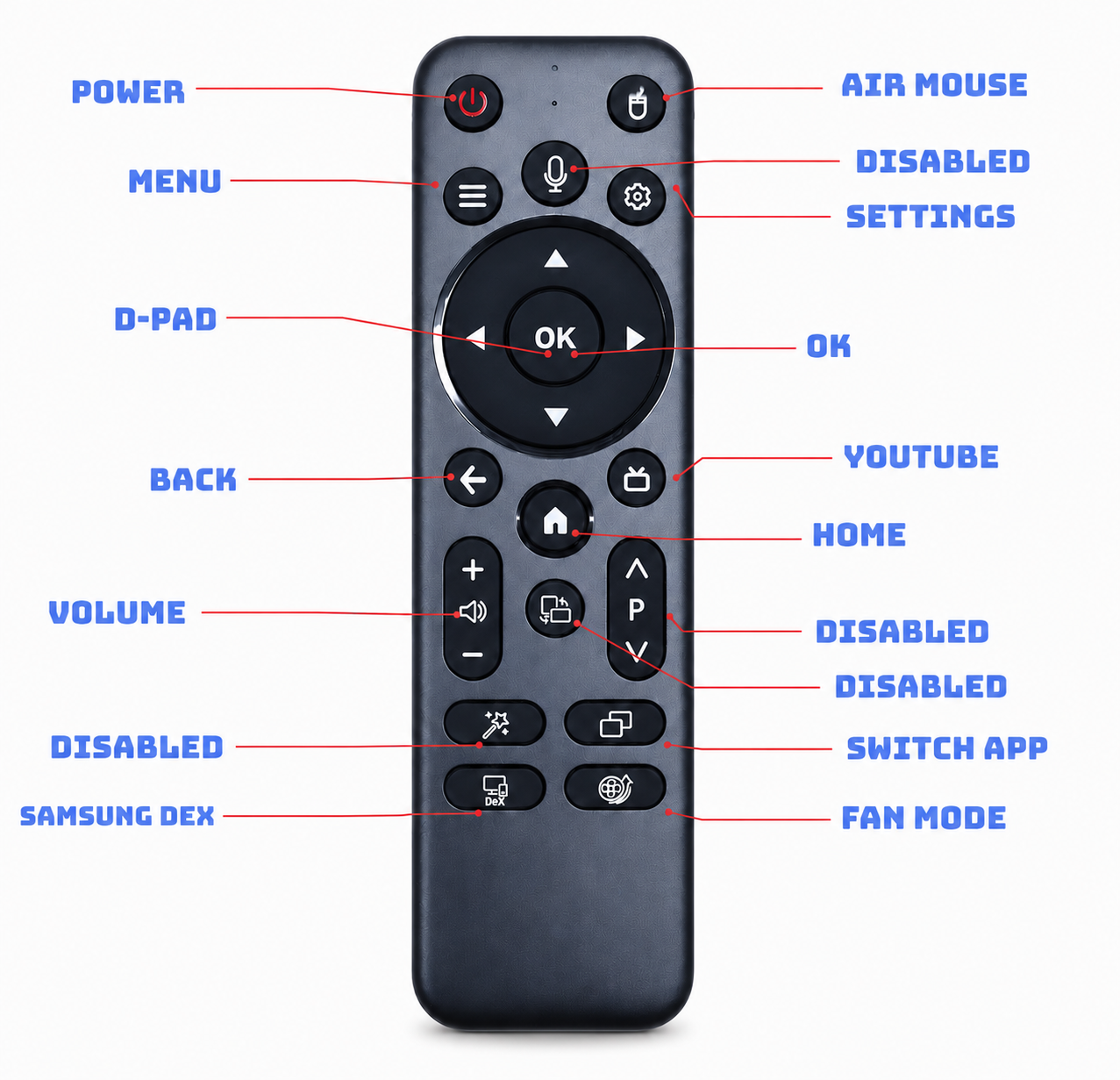
Air Mouse Control
The updated remote includes an air mouse button for situations where pointer-style control is faster than directional navigation. This is useful when an app is designed more like a mobile or desktop interface, or when a small on-screen item is easier to select directly.
Faster Access to Common Apps and Modes
A dedicated YouTube button gives quick access to one of the most common streaming use cases. The remote also includes a Switch App button, making it easier to move between recently used apps without returning to the home screen each time.
Samsung DeX support is also included as a dedicated shortcut. For users who use DeX-style workflows, this helps the Z Box setup feel more flexible, especially when moving between entertainment and productivity-style usage.
The Fan Mode button gives direct access to cooling behavior. Instead of burying this control deep inside settings, the updated remote makes it easier to adjust cooling when performance, noise, or room conditions change.
Disabled Keys Reserved for Future Features
Some buttons are marked as Disabled in the current remote layout. This means those button functions are temporarily canceled for the current software experience, not that the hardware has no future purpose.
These keys are being kept in the layout so the Z Box team can continue developing the corresponding functions over time. For now, the active controls remain focused on the features people need most: power, navigation, air mouse, menu, settings, volume, app switching, YouTube, Samsung DeX, and fan mode.
Built for the Living Room
The goal of the updated Z Box remote is simple: make the device easier to live with.
A good remote should disappear into the experience. It should help users move quickly, correct mistakes easily, and access common features without extra steps. With the redesigned remote, the updated Z Box becomes more comfortable for streaming, browsing, app control, and everyday media use from the sofa.
This is one part of the updated Z Box story. Alongside interface improvements, cooling changes, and a refreshed exterior design, the new remote is focused on making the whole product feel cleaner, more practical, and more ready for modern living-room setups.